
 Loading...
Microwars Unblocked - Play Online Free on Games Twis offers a fast and fun strategy experience where players control small cells and expand across the map. In Microwars Unblocked, each move matters, as players must grow their army, choose the right targets, and defend their territory at the same time.
The game is simple to learn, which makes it perfect for kids and beginners. At the same time, it gives enough challenge to keep players focused and excited. Each round is quick, so players can enjoy short sessions and improve their strategy step by step.
With no download required and smooth gameplay on any device, Microwars Unblocked is a great choice for anyone who enjoys smart and fast games. Jump in, test your skills, and see how quickly you can take control of the entire map.
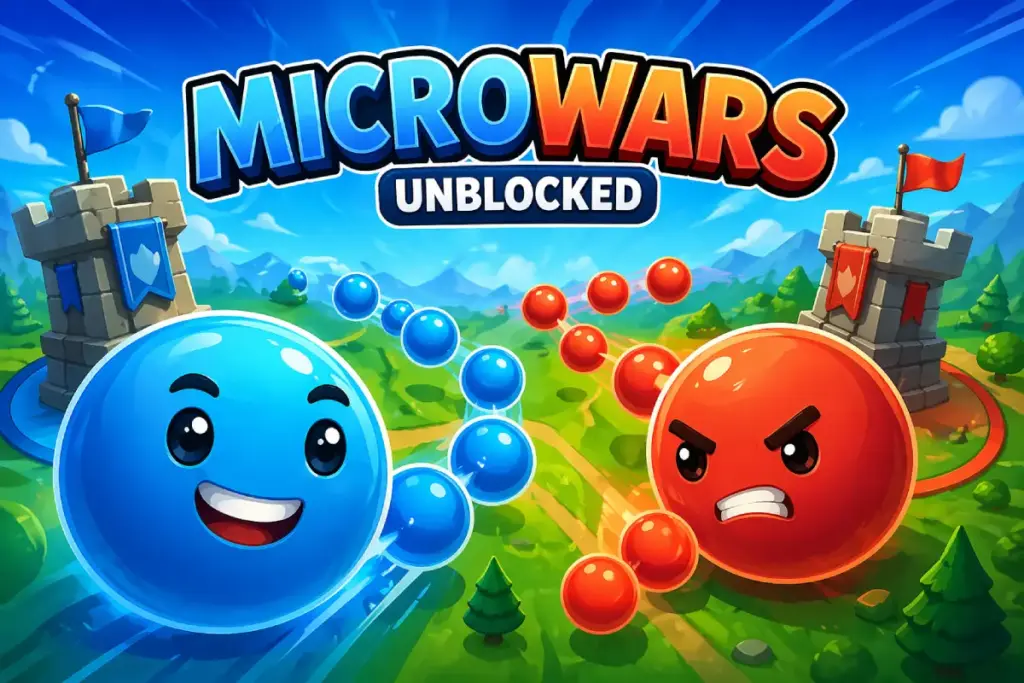
Table of Contents
What is Microwars Unblocked?
Microwars Unblocked is a territory capture game built around fast choices and map control. You begin with one or more cells and try to grow faster than the other side. The goal is simple, but the action stays tense because every attack changes your defense. That mix makes each round feel active from the first second.
Microwars Unblocked uses a clean style that helps players read the field fast. You can see which cell is weak, which route is safe, and where your next push should go. The game does not bury you under long menus. You get into the action quickly and learn by playing.
Microwars Unblocked also works well for younger players because the rules are easy to grasp. Send units, take neutral cells, cut enemy growth, and hold your lead. Older players still get enough depth to plan chains, bait attacks, and time moves. This balance helps the game fit many ages.
Microwars Unblocked is a good match for players who like short sessions with a clear win goal. You can jump in for a quick round, test a fresh route, and try again right away. For more quick picks like this one, visit our Unblocked Games page.
Gameplay Overview of Microwars Unblocked
The main loop is all about growth and pressure. Your cells produce more units over time. You move those units to empty cells first, then push into enemy space. If you spread too fast, your base becomes weak. If you wait too long, the other side gets stronger.
Most rounds reward smart order more than wild speed. Taking a nearby neutral cell can boost your next attack. Holding a key point can split the map and slow enemy traffic. Strong players look for routes that grow their side while cutting the rival side at the same time.
The difficulty rises as maps add more cells, tighter spaces, and more active enemies. Early rounds teach control and timing. Later rounds ask you to read the full map and react fast. This keeps the game fun for new players while still giving skilled players room to improve.
Microwars Unblocked feels good because a failed plan is easy to read. You usually know why you lost. Maybe you attacked too early. Maybe you left a path open. Maybe you chased one target and lost control elsewhere. That clear feedback helps each new run feel useful.
Matches stay short, which helps replay value. A round can end in a few minutes, so retries never feel heavy. That is a strong point for school breaks and short family play sessions. The game gives quick action without a long setup.
Where to Play Microwars Unblocked: You can play it in a web browser on desktop, and public browser listings also tie the game to touch play, which helps on phones and tablets. You do not need to install the browser version to start a match.
How to Play Microwars Unblocked?
Start by looking at the nearest neutral cells. These are often the safest first targets. They raise your unit output and give you more routes. Do not rush the enemy base in the first seconds unless the map clearly gives you an easy opening.
After your first capture, check which cell can become your main hub. A central position often lets you attack and defend with less travel time. This matters because unit movement is part of your timing. A short route can save a weak cell before it falls.
Try to attack from strong cells, not from every cell at once. Emptying too many positions leaves holes in your line. It is better to build one clean push than three weak ones. This is one of the first habits that helps new players win more often.
Watch enemy movement. If the rival sends a large wave away from a key point, that spot may become weak for a moment. Use those small windows. A late attack often fails. A well timed one can flip the full map.
Keep one eye on defense even when you lead. Many losses happen after players get greedy and overextend. If you own more cells but cannot protect them, the other side can swing back fast. Safe growth is better than flashy growth.
Use retries to test one change at a time. Try a new first capture. Try a new route. Try a faster cut toward the center. Small changes often make a big difference in Microwars Unblocked.
Quick Start
Open the game, pick a map, and take the nearest neutral cell. Wait a moment to build more units, then push into the next weak target. Keep your largest cell ready to defend or strike where the enemy looks thin.
For your first wins, focus on simple shapes. Grow in one direction, hold the center, and avoid attacks from low unit cells. This keeps your line clean and helps you learn map flow without stress.
Objectives and Victory Conditions
Your main goal is to control the full map or remove every enemy cell. You do this by building more units than your rivals and using them with smart timing. Raw speed is not enough on its own.
Points and progress usually come from completed levels, faster wins, and cleaner control of the board. Some versions also use a level path with stronger enemy setups later on. That means early wins teach the basics, while later stages ask for sharper planning.
You win most often when your attacks create two results at once. A good move grows your side and weakens the enemy side. When you can do both with one route, you take control of the match faster.
Controls
Microwars Unblocked uses easy controls that fit new players well. The game is built around selecting a cell and sending units to another target.
Keyboard and Mouse
On desktop, you usually click a friendly cell, hold or drag toward another cell, and release to send units. This makes route planning fast and clear. A mouse works well because you can switch targets in a split second.
If the browser page offers keyboard support, common keys may handle pause, restart, or menu actions. The main action still comes from the mouse. Full screen can also help you read lines and targets more clearly on larger maps.
Touch Controls (Mobile)
On mobile, tap your cell and drag toward the target cell. Short drags help with close routes, while careful swipes help on crowded maps. Keep your finger steady so you do not send units to the wrong node.
Touch play feels best when you zoom your focus on the center of the map and avoid rushed gestures. If your phone screen feels busy, rotate the device and use a stable grip. A clean hold helps quick choices.
Controller (Gamepad)
Most browser versions of Microwars Unblocked are built around pointer controls first. A controller may work through browser tools or device mapping, but support can change from one page to another.
If you try a gamepad, test menu movement and cursor speed before a real match. For many players, mouse or touch still feels better because route selection needs quick aim.
Game Tips and Tricks
Good scores come from calm growth, clean routes, and fast reactions. Build your side in layers, protect the center, and never leave your biggest cell empty without a reason.
Tips for Beginners
- Take nearby neutral cells first: Easy growth gives you more room for your next move.
- Do not empty every base: A weak line invites fast enemy counter attacks.
- Watch the center: Middle cells often decide both attack speed and defense.
- Retry with one small change: A new first move can fix a hard level.
- Stay patient: Waiting two more seconds can build a much stronger push.
Advanced Strategies
- Split the map: Cut enemy routes so their growth cannot support the front line.
- Bait a response: Pressure one side to pull units away from a better target.
- Chain captures: Use fresh cells as steps toward the next attack.
- Hold one reserve cell: Keep a strong base ready for defense or a final strike.
- Read traffic flow: Attack where enemy units are moving away, not where they are gathering.
Features of Microwars Unblocked
These features help the game stay fun in short sessions. They also make each retry feel useful and easy to follow.
Main Features
- Quick strategy battles: Matches are short and easy to restart.
- Simple controls: Click, drag, and send units in seconds.
- Territory capture play: Every cell matters for growth and defense.
- Level based progress: New maps add pressure and fresh layouts.
- Browser access: You can start without a long setup.
What Makes It Special
Microwars Unblocked stands out because it keeps strategy clear. You can read the map fast and still make smart plans. The game does not need long text or many systems to feel tense.
It also has strong replay value. A level that feels hard at first can become easy after one better route. That kind of progress feels good because it comes from player skill, not luck.
Another good point is the short session length. You can play one match, learn one lesson, and jump right back in. That rhythm fits both casual players and more serious strategy fans.
Game Details
- System Requirements: A modern browser, an internet connection, and a device with mouse or touch input are enough for the browser version. No installer is needed for browser play.
- Developer: Public mobile store listings name Benoit Freslon as the developer of MicroWars. Browser portals list Microwars as a browser title, but they do not always show the same credit line on the play page.
- Technology: The browser version is listed as a web game, and HTML5 is the common format used for this kind of instant play title.
- Release Date: A public browser listing shows January 14, 2022.
- Platform: Browser on desktop is listed publicly, and the wider franchise is also available on Android and iOS.
- Category: Action Games
Performance and Troubleshooting
If the game feels slow, refresh the page first. This clears many small loading issues. If that does not help, close other tabs and open the game again. Too many active tabs can lower browser speed on older devices.
If audio does not start, tap or click once inside the game area. Some browsers block sound until you interact with the page. Also check that the tab is not muted.
If input feels delayed, try full screen mode and a stable internet connection. Browser games often feel smoother when the device is not switching between many active tasks. A wired or strong Wi Fi link can help on desktop.
On mobile, lower screen brightness apps, floating windows, or battery saver tools can affect game response. Close them before you play. A simple restart can also clear memory pressure.
If a page still does not run well, try another browser. Chrome, Edge, Safari, and Firefox do not always behave the same way with web games. Hardware acceleration can also help if your browser supports it and your device handles it well.
Updates
Public browser listings show Microwars with a last update date of September 6, 2024. Detailed patch notes are not posted on that page, so the update likely covers polish, fixes, or small play changes rather than a full redesign.
Is Microwars Unblocked free?
Yes, the browser version of Microwars Unblocked can be played online without a paid download. That makes it easy for students, teens, and families who want quick strategy play with no long setup.
You also do not need to create an account just to start the browser version on many game portals. That lowers friction and helps new players test the game in seconds. On some mobile store versions, ads or in app purchases may appear, so browser and mobile access can feel a bit different.
For a fast session on a laptop, tablet, or phone browser, the free browser option is usually the simplest way to play.
Is it safe?
Microwars Unblocked is safer to try in a browser because you are not dealing with random installers. You open the page, load the game, and start playing. That lowers the risk that comes with files from unknown sites.
You should still use trusted pages with HTTPS and a clean game page. Avoid strange popups, fake update messages, and copied sites with too many redirects. A safe page feels simple and loads the game directly.
For mobile downloads, use the official Google Play or App Store pages when they are available. This gives you better app checks, clearer permissions, and easier updates.
It is also smart to avoid unofficial save tools, modified files, or shady download pages. These can put your device and data at risk.
Where can I play Microwars Unblocked without being blocked?
You can play Microwars Unblocked best on a reliable HTTPS gaming site that loads in the browser with no extra setup. Our site is built for quick access, easy navigation, and simple game starts.
If your school or work network blocks one page, try another trusted browser, switch from school Wi Fi to a home or mobile network, or test the game later on a personal device. Keep your play safe and use pages that load the game clearly.
Why is Microwars Unblocked so fun?
The controls feel direct, so each move has a clear result. You can see the line, the target, and the change on the map right away. That makes the action easy to read and fun to repeat.
Retries are also quick. You do not lose much time when a plan fails. You can jump back in, adjust one route, and try again. This keeps frustration low and learning high.
The game also has a nice sense of growth. One small cell becomes a chain of control points, then a full map push. That rise in power feels rewarding because you build it step by step.
Short sessions help too. You can enjoy one clean match in a small break, then come back later for more. That makes Microwars Unblocked easy to fit into daily play.
Similar Games to Microwars Unblocked
If you’re a fan of Action Games, you’ll definitely enjoy these too:
- Territorial.io
- Battle for the Galaxy
- 1942 Pacific Front
- Merge Battle Tactics
Download Microwars Unblocked
If you prefer playing on your phone or tablet, you can also download Microwars Unblocked from official stores. The mobile version offers the same fun gameplay with smooth controls and easy access anytime.
On Android: Open Google Play and follow the steps to install the game.
On iOS (iPhone/iPad): Go to the App Store and tap “Get” to start downloading.
Important: Always download the game from official sources like Google Play or the App Store. Avoid unknown websites, as they may harm your device or your personal data.
FAQ
What is Microwars Unblocked?
Microwars Unblocked is a strategy browser game where you control cells and try to capture the entire map.
Can I play Microwars Unblocked for free?
Yes. You can play it online for free with no download required.
How do you play Microwars Unblocked?
You send units from your cells to others to expand, defend, and defeat your opponent.
Is Microwars Unblocked safe?
Yes. It is safe when played on trusted websites since it does not require installation.
Does Microwars Unblocked work on mobile?
Yes. The game works on mobile devices with simple touch controls.
Conclusion
Microwars Unblocked is a simple and fun strategy game that anyone can enjoy. The rules are easy to understand, so players can start playing right away without feeling confused. Each match helps you learn something new, like when to attack and when to wait.
The game is perfect for short play sessions. You can play one round, improve your skills, and try again in just a few minutes. This makes Microwars Unblocked a great choice for kids, teens, and families who want quick and enjoyable gameplay without any setup.
If you like smart and fast games that test your thinking, Microwars Unblocked is a great choice. Start playing now, enjoy every match, and explore more free browser games on our site.